
Kinsta vs WP Engine at a glance
Disclosure: this article contains affiliate links. If you sign up through them, we may earn a commission at no extra cost to you.
If you’re weighing up Kinsta vs WP Engine, you’ve already decided cheap shared hosting isn’t cutting it anymore. Both are premium managed WordPress hosts, both cost roughly the same to get started, and both promise speed, security and expert support. So which one actually deserves your money?
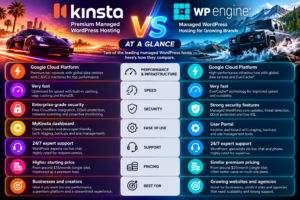
Here’s the short answer. Kinsta is the better pick for most single site owners and small businesses thanks to its security extras, built-in performance monitoring and a free first month. WP Engine makes more sense if you want bundled premium themes, longer backup retention, or you’re an agency building sites for clients.
| Kinsta | WP Engine | |
|---|---|---|
| Entry price (monthly billing) | $35/month | Around $30/month |
| Entry price (annual billing) | $30/month ($350/year) | $28/month ($336/year, first year) |
| Free trial | First month free on entry plans | No free trial |
| Entry plan storage | 10GB | 10GB |
| Extra sites | $30/month each | $20/month each |
| Backup retention | 14 days on entry plans | 30 to 60 days |
| CDN | Cloudflare, 260+ locations | Cloudflare |
| Advanced WAF and DDoS | Included on all plans | Paid add-on on Essential |
| Malware removal | Free | Not listed as included |
| Uptime SLA | Up to 99.99% on all plans | 99.99% on Core and above only |
| Free migrations | Unlimited, done for you | Automated migration plugin |
| Premium themes included | No | 10 themes plus Genesis Blocks |
| Support | 24/7 chat in 8 languages | 24/7 technical support |
Try Kinsta free for your first month: [KINSTA AFFILIATE LINK]
Who each host is best for
Before we get into the detail, it helps to know who each company is really built for. They overlap a lot, but their strengths point in slightly different directions.
Choose Kinsta if you:
- Run one or two business-critical WordPress sites and want strong security included without paying for add-ons
- Want to try before you commit (the first month is free on entry plans)
- Like having performance tools built in, such as Kinsta’s APM for finding slow plugins
- Want someone else to handle your migration for you, however many sites you move
- Care about uptime guarantees even on a starter plan
Choose WP Engine if you:
- Build sites for clients and want to hand them over easily with transferable sites
- Want 10 premium themes and Genesis Blocks included to speed up site building
- Need longer backup retention out of the box
- Plan to add lots of small sites cheaply, since extra sites cost $20 a month compared with $30 at Kinsta
- Already use tools from the WP Engine family, such as Local, Advanced Custom Fields or WP Migrate
If you’re a blogger or small business owner moving up from shared hosting, Kinsta will usually give you more for the same money. If you’re an agency or a developer building lots of sites, WP Engine’s tooling starts to earn its keep.
Kinsta vs WP Engine pricing compared
On headline price, there’s very little between them. Kinsta’s entry plans cost $35 a month, or $30 a month if you pay annually ($350 for the year). WP Engine’s Essential plan starts at $28 a month on annual billing ($336 for the first year), with monthly billing coming in a little higher.
The small print is where the real differences show up.
Kinsta pricing in brief
- Single-site plans run from $35 up to $375 a month, priced either by bandwidth or by monthly visits (you choose which suits you)
- The Launch plan at $35 a month gives an estimated 75,000 visits, 15GB storage and 125GB of CDN bandwidth
- Multi-site plans start at $70 a month for 2 sites and go up to 40 sites
- Agency plans start at $340 a month, and enterprise plans from $500
- The first month is free on the entry plans, and every plan is covered by a 30-day money-back guarantee after that
- Annual billing gets you two months free
WP Engine pricing in brief
- Essential covers 1 to 30 sites, 25,000 to 400,000 visits a month and 10 to 50GB storage, with 75GB bandwidth
- The advertised starting price is first-year pricing for new customers, and WP Engine states that renewal pricing can change
- Annual billing saves 20% on Essential
- Core, with isolated resources and a 99.99% SLA, is sold through their sales team and is widely reported to start around $400 a month
- There’s no free trial
Watch out for overages. Both hosts will keep your site online if you go over your limits and then charge for the extra usage. WP Engine is widely reported to charge $2 per 1,000 extra visits. Kinsta notifies you at 80% and 100% of your allowance and publishes its overage rates in its docs. If your traffic is spiky, check both before you choose.
Watch out for renewals. WP Engine is clear that its first-year price is a new-customer offer. Budget for the renewal price, not just the headline number. Kinsta’s annual discount isn’t described as introductory, so the price you see is closer to what you’ll keep paying.
Bottom line on price: they’re neck and neck at entry level, but Kinsta includes more security as standard, while WP Engine sells some of those extras as add-ons. Once you factor that in, Kinsta usually works out as the better value for a single site.
Performance and infrastructure
Speed is the main reason people pay for managed WordPress hosting, so this matters. Both hosts are fast. The difference is in how they get there.
Kinsta runs on Google Cloud, with each site in its own isolated container. That means a busy neighbour on the same server shouldn’t slow your site down. On top of that you get:
- Cloudflare integration with edge caching and a CDN spread across more than 260 locations
- Continuous MySQL database optimisation, running automatically in the background
- A built-in APM (application performance monitoring) tool that shows you exactly which plugin or database query is dragging your site down
- An option to allocate extra PHP threads and memory as an add-on if you need more power
WP Engine uses its own EverCache system, which is caching built specifically for WordPress, alongside a Cloudflare-powered CDN. On the Essential plans your site sits on shared resources, while Core and Enterprise move you onto isolated servers. Front-end optimisation through NitroPack and application performance monitoring are available, but as add-ons or on higher plans.
[SCREENSHOT: your own speed test results for a test site on Kinsta, e.g. PageSpeed Insights or GTmetrix]
Our take: for a single site on an entry plan, Kinsta’s isolated containers and built-in APM give it the edge. You’re not sharing resources in the same way, and when something slows down you can actually see why. WP Engine closes the gap on its Core plans, but those cost many times more.
Features head to head
Both hosts cover the managed WordPress basics well: automatic WordPress and PHP updates, free SSL, SSH access, daily backups and one-click staging. Here’s where they pull apart.
Security
This is Kinsta’s clearest win. Every Kinsta plan includes a fully managed firewall with Cloudflare’s enterprise-level DDoS protection, bot protection and free malware removal if your site ever gets hacked. WP Engine includes basic DDoS protection and security patching on every plan, but its advanced DDoS protection and managed firewall are an optional add-on.
Backups
WP Engine wins here. It keeps backups for between 30 and 60 days. Kinsta’s entry plans keep them for 14 days, rising to 20 or 30 days on bigger plans. Kinsta does offer more frequent backups (every 6 hours or every hour) and external backups to AWS or Google Cloud as paid add-ons.
Staging
Both give you free one-click staging environments. Kinsta also sells premium staging environments for heavier testing, while WP Engine includes separate development environments too.
Migrations
Kinsta’s expert team will migrate your sites for you, as many as you like, for free, and they’ll clean up malware along the way. WP Engine gives you a free automated migration plugin on Essential, with a managed migration service on Core.
Site building extras
WP Engine includes 10 premium themes, Genesis Blocks and transferable sites, which lets you build a site and then hand it over to a client’s account. Kinsta doesn’t bundle themes, but it does offer DevKinsta, a free tool for building WordPress sites on your own computer.
Automatic plugin updates
Both offer automatic plugin and theme updates that check your site visually and roll back if something breaks. Kinsta charges $3 per environment a month. On WP Engine it’s an add-on for Essential and included with Core.
Dashboard and ease of use
You’ll spend a lot of time in your hosting dashboard, so it’s worth knowing what each one feels like.
MyKinsta is Kinsta’s own custom dashboard, and it’s one of the cleanest in the industry. Everything sits in one place: your sites, backups, staging, cache clearing, domains, analytics and the APM tool. You can add unlimited users and control exactly what each person can access, which is handy if you work with a developer or VA. There’s also a Kinsta API if you want to automate tasks like creating sites or clearing cache.
[SCREENSHOT: MyKinsta dashboard overview]
The WP Engine User Portal covers the same ground: sites, environments, backups, SSL, domains and usage stats. It’s well organised and feels geared towards people managing several sites at once. WP Engine also offers an API, SSH access and tight integration with Local, its free local development tool.
Our take: both are easy to use, and you won’t struggle with either. MyKinsta feels slightly more modern and puts more useful information in front of you, especially performance data. WP Engine’s portal is a comfortable fit if you’re juggling lots of client sites.
Support
When your site goes down at 2am, support is the only feature that matters.
Kinsta offers 24/7 support by live chat in 8 languages, staffed by people who know WordPress inside out. You get the same level of expert support on every plan, including the cheapest one, and bigger plans add a dedicated account manager. Kinsta is rated 4.8 out of 5 on G2 from over 1,600 reviews, and support comes up again and again as a highlight.
WP Engine also provides 24/7 technical support from WordPress specialists. Entry-level plans are mainly chat based, with phone support reported on higher tiers. Enterprise customers get target response times of just one minute and access to premium onboarding.
Our take: both have strong reputations here. Kinsta’s advantage is consistency, since you get the same expert help whatever you pay. If phone support matters to you, check which WP Engine plan includes it before you buy.
Kinsta vs WP Engine for WooCommerce
Online stores are harder to host than blogs. Carts, checkouts and customer accounts can’t be cached the same way as normal pages, so your server does a lot more work on every sale.
Kinsta marks which plans it recommends for ecommerce and membership sites. Its very cheapest bandwidth-based plans aren’t on that list, but the $35 Launch plan and everything from Single 40GB upwards is. Kinsta also offers Redis caching as an add-on at $100 per site a month, which takes a lot of pressure off your database on busy stores. The built-in APM tool is especially useful for WooCommerce, where one slow plugin can drag down your whole checkout.
WP Engine has a dedicated eCommerce solution and is a solid home for WooCommerce too. The catch is that its entry plans run on shared resources, so busy stores may find themselves pushed towards Core sooner than they’d like.
Our take: for a small to mid-sized store, Kinsta’s Launch plan or higher is the stronger starting point. Pair it with a good email marketing platform and you’ve got a setup that can grow with you. [INTERNAL LINK: your Klaviyo review or Klaviyo for WooCommerce article]
Kinsta vs WP Engine FAQs
Is Kinsta faster than WP Engine?
For entry-level plans, Kinsta usually has the edge because every site runs in its own isolated container on Google Cloud, while WP Engine’s Essential plans use shared resources. On WP Engine’s Core and Enterprise plans, the gap narrows.
Which is cheaper, Kinsta or WP Engine?
They’re very close. Kinsta costs $30 a month billed annually, and WP Engine starts at $28 a month billed annually for the first year. Kinsta includes more security as standard, so it often works out better value overall.
Does Kinsta have a free trial?
Yes. Kinsta gives new customers their first month free on its entry plans, and all plans come with a 30-day money-back guarantee. WP Engine doesn’t offer a free trial.
Can I migrate to Kinsta for free?
Yes. Kinsta includes unlimited free migrations on every plan, handled by its own migrations team.
Is WP Engine good for agencies?
Yes. Transferable sites, bundled premium themes and cheaper extra sites ($20 a month) make WP Engine a strong choice for agencies building sites for clients. Kinsta also runs dedicated agency plans from $340 a month.
Can I host multiple sites on Kinsta?
Yes. Multi-site plans start at $70 a month for 2 WordPress installs and go up to 40, with agency and enterprise plans beyond that. You can also add single extra sites for $30 a month.
Final verdict: Kinsta or WP Engine?
You can’t go badly wrong with either. Both are proper managed WordPress hosts with fast infrastructure and knowledgeable support, and both are a big step up from shared hosting.
For most people reading this, though, Kinsta is the one we’d pick. You get enterprise-grade security, free malware removal, an uptime SLA and a performance monitoring tool on the cheapest plan, where WP Engine charges extra for several of those or saves them for pricier tiers. The free first month and done-for-you migrations also make switching almost risk free.
WP Engine is the better choice if you’re an agency or freelancer building lots of client sites, you want premium themes bundled in, or long backup retention is a must.
If you’re still on the fence, the easiest thing to do is try Kinsta for a month at no cost, let their team migrate your site, and see how it performs with your own eyes.
Try Kinsta free for your first month, click here